Engineering GPU Infrastructure for AI Workloads
A hands-on introduction to GPU inference serving on Amazon EKS.
In three and a half hours you will take an EKS cluster from zero GPUs to serving a real large language model on GPU nodes — with autoscaling, GPU sharing, and monitoring in place — and leave with a repo that reruns all of it with one command.
This is an inference workshop. We serve a live LLM with vLLM. Training (EFA, NCCL, distributed jobs) is out of scope; the wrap-up points you to the right material for it.
What you will build
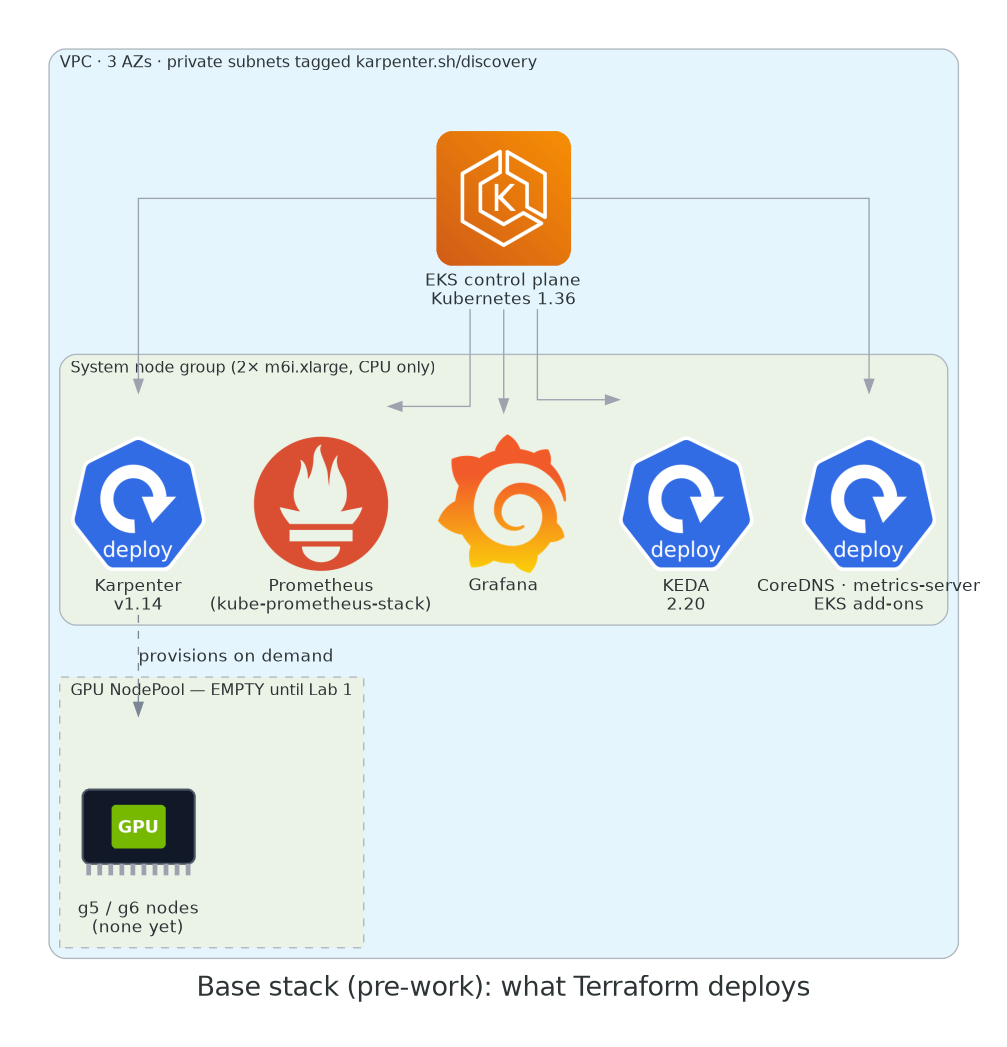
By the end of Lab 2 your cluster is running:
- a Karpenter NodePool that provisions g5/g6 GPU nodes on demand, Spot-first with On-Demand fallback, on a pinned AMI;
- the NVIDIA GPU Operator configured correctly for EKS (spoiler: with the driver disabled);
- a node time-sliced four ways, and a second node that is not — and you'll know why you'd want each;
- vLLM serving
Qwen2.5-1.5B-Instructbehind an OpenAI-compatible endpoint; - KEDA scaling vLLM on requests in flight, with Karpenter adding GPU nodes behind it;
- DCGM → Prometheus → Grafana dashboards that show you where the money goes.
Who this is for
Platform and DevOps engineers who are comfortable with Kubernetes basics — you can explain what a Deployment and a Service are, and you have run kubectl apply in anger — and who are new to GPU infrastructure. No ML background needed. No CUDA knowledge needed.
Agenda
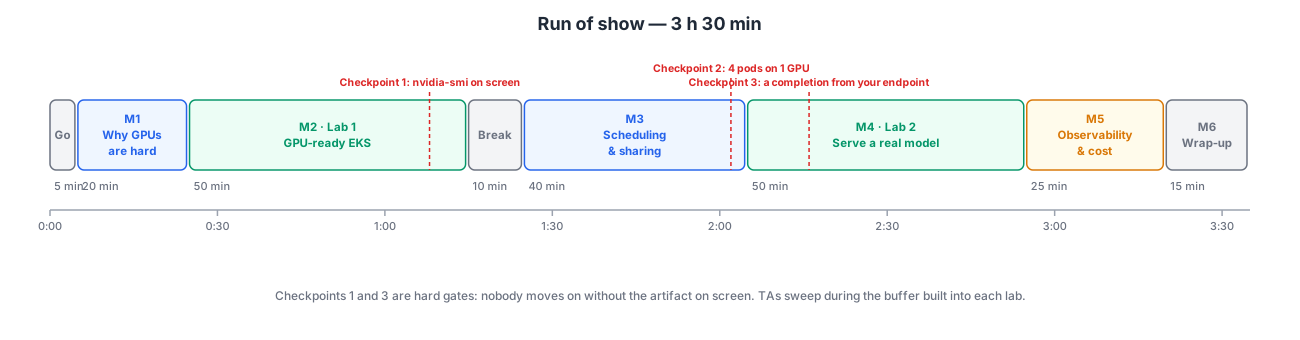
| # | Segment | Type | Time |
|---|---|---|---|
| — | Starting now, house rules | 5 min | |
| 1 | Why GPUs on Kubernetes are hard | talk + demo | 20 min |
| 2 | Lab 1: a GPU-ready EKS cluster | lab | 50 min |
| Break | 10 min | ||
| 3 | GPU scheduling & sharing | talk + mini-lab | 40 min |
| 4 | Lab 2: serving a real model | lab | 50 min |
| 5 | Observability & cost | talk + guided demo | 25 min |
| 6 | Wrap-up | 15 min |
Before you arrive
Do the pre-work. It is not optional.
Two things take real calendar time and cannot be done during the session:
- GPU quota. Fresh AWS accounts have a quota of zero for G-family instances. Increases can take 24–48 hours. Request it today →
- The base stack. The EKS control plane, Karpenter and the monitoring stack take ~20 minutes to create. Deploy it the day before →
Attendees who arrive without these will watch, not build.
How the labs work
Every step follows the same shape: what you're about to do, the command, what you should see, why it matters. Copy buttons are on every code block. Where EKS behaves differently from a generic Kubernetes cluster, you'll see this:
EKS quirk
The thing that will bite you in production if nobody told you.
And at the end of each lab:
Checkpoint
The one artifact you must have on screen before moving on. Checkpoints 1 and 3 are hard gates — nobody gets left behind; checkpoint 2 is a quick show of hands.
Conventions
- Commands are for a POSIX shell (macOS, Linux, WSL). Every command is run from the root of the companion repo.
$is the prompt; don't type it. Output blocks are illustrative — names, IDs and timings will differ.- The companion repo is
abebars/gpu-eks-workshop. Manifests shown in the guide are the actual files inmodules/, embedded at build time, so what you read is what you apply.
Ready? Start the pre-work →