3.4 The fifth pod
Node A is full: four slices, four pods. Now a fifth workload arrives. It's a data scientist's notebook — it asks for a whole GPU and then does absolutely nothing with it. Every GPU fleet has one.
# "Someone's notebook." Requests a whole GPU and then does nothing with it.
# Every GPU fleet has one of these. We keep it running through Lab 2 and
# hunt it down on the dashboards in Module 5.
apiVersion: v1
kind: Pod
metadata:
  name: forgotten-notebook
  labels:
    app: forgotten-notebook
    team: data-science
spec:
  tolerations:
    - key: nvidia.com/gpu
      operator: Exists
      effect: NoSchedule
  containers:
    - name: notebook
      image: nvidia/cuda:12.8.1-base-ubuntu22.04
      command: ["sleep", "infinity"]
      resources:
        requests:
          cpu: 100m
          memory: 256Mi
        limits:
          memory: 512Mi
          nvidia.com/gpu: 1
Pending — no node has a free nvidia.com/gpu. Your watch pane from Lab 1 shows Karpenter reacting within seconds:
While it boots (~3 min), think about what's not going to happen: the new node will not be time-sliced. The ConfigMap is cluster-wide, but the config only applies to nodes carrying the nvidia.com/device-plugin.config label, and Karpenter creates nodes with the labels in the NodePool template — which doesn't include it. So node B comes up exclusive: nvidia.com/gpu: 1.
Two nodes, two policies
kubectl get nodes -l karpenter.sh/nodepool=gpu -o custom-columns='NAME:.metadata.name,INSTANCE:.metadata.labels.node\.kubernetes\.io/instance-type,GPU:.status.allocatable.nvidia\.com/gpu,PRODUCT:.metadata.labels.nvidia\.com/gpu\.product,CONFIG:.metadata.labels.nvidia\.com/device-plugin\.config'
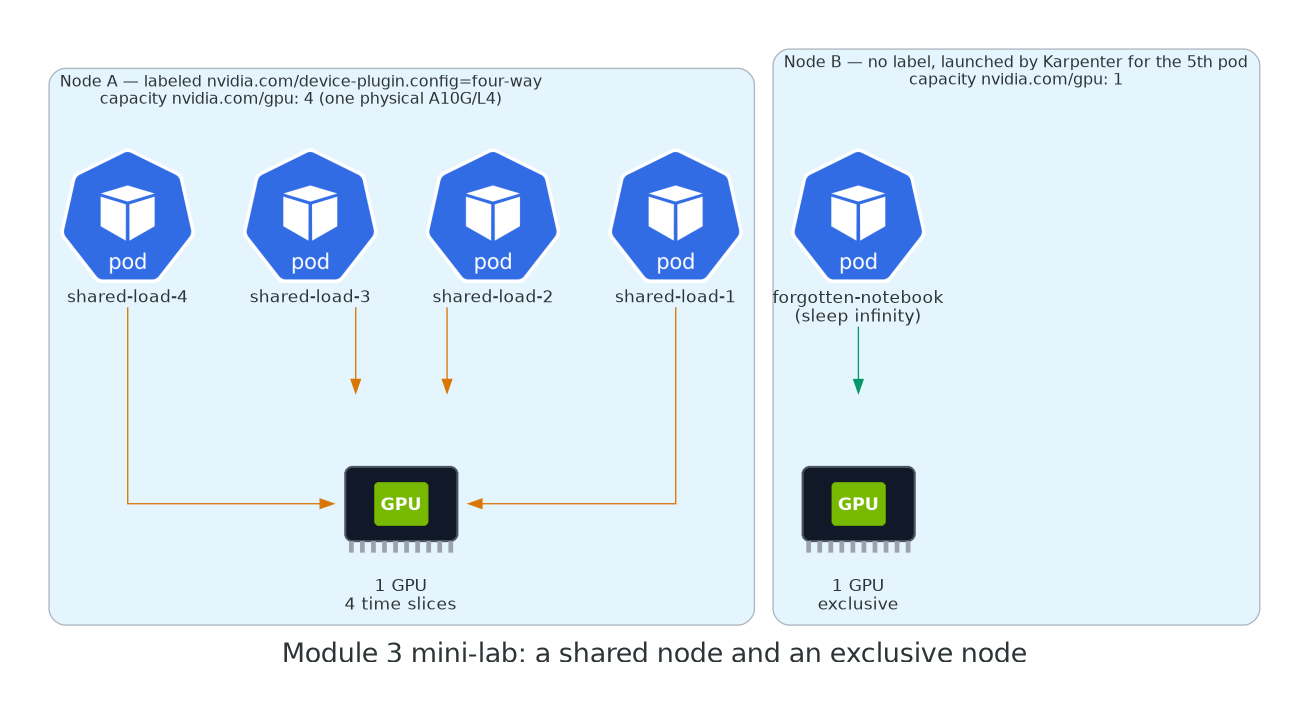
That is a mixed fleet in one NodePool: a shared node for the four small jobs, an exclusive node for the one that (claims it) needs a whole card. The production version of this is two NodePools — gpu-shared with nvidia.com/device-plugin.config: four-way in its template labels so every node it creates is sliced on arrival, and gpu-exclusive without — and workloads pick with a nodeSelector. Same mechanism, zero manual labelling.
What that NodePool template looks like
apiVersion: karpenter.sh/v1
kind: NodePool
metadata:
  name: gpu-shared
spec:
  template:
    metadata:
      labels:
        nvidia.com/device-plugin.config: four-way   # sliced on arrival
        gpu-tier: shared
    spec:
      # ...same requirements, taint and nodeClassRef as the gpu pool
Then in a dev-notebook Deployment: nodeSelector: {gpu-tier: shared}. In the inference Deployment: nodeSelector: {gpu-tier: exclusive} or nvidia.com/gpu.product: NVIDIA-A10G (which the -SHARED suffix will never match).
Leave the notebook running
Don't delete forgotten-notebook. It's holding a $1/hour GPU at 0% utilisation and it will keep doing that through Lab 2. In Module 5 you'll find it from the dashboards, which is how you'll find the real ones.