Before the workshop
The session is 3.5 hours and two of those are hands-on. That only works if the slow, boring parts are done before we start. There are four steps; two of them involve waiting on AWS, which is why you get this a week early.
| When | Step | Why it can't wait |
|---|---|---|
| Today | 1. Request GPU quota | New accounts have 0 vCPUs of GPU quota. Increases can take 1–2 business days. |
| This week | 2. Install the tools | Version skew (kubectl, terraform) is the #1 cause of "it doesn't work on my machine". |
| The evening before | 3. Deploy the base stack | EKS control plane + Karpenter + monitoring take ~20 minutes to come up. |
| Morning of | 4. Preflight check | One command that tells you whether you're ready. |
What you need
- An AWS account you can create resources in. You need permissions to create VPCs, EKS clusters, IAM roles and EC2 instances. Admin on a personal or sandbox account is the simplest path. Corporate accounts with SCPs blocking GPU instances or IAM role creation will not work — check with your cloud team now, not on the day.
- A laptop with a POSIX shell (macOS, Linux, or Windows with WSL2) and the tools in step 2.
- Roughly $15–25 of AWS spend for the session plus the base stack idling overnight, assuming you tear down at the end (we do that together in Clean up).
Which region?
The guide assumes us-east-1. us-west-2 also works well for g5/g6 capacity. Pick one, request quota in that region, and set AWS_REGION consistently. Don't change your mind on workshop day.
What the pre-work does not do
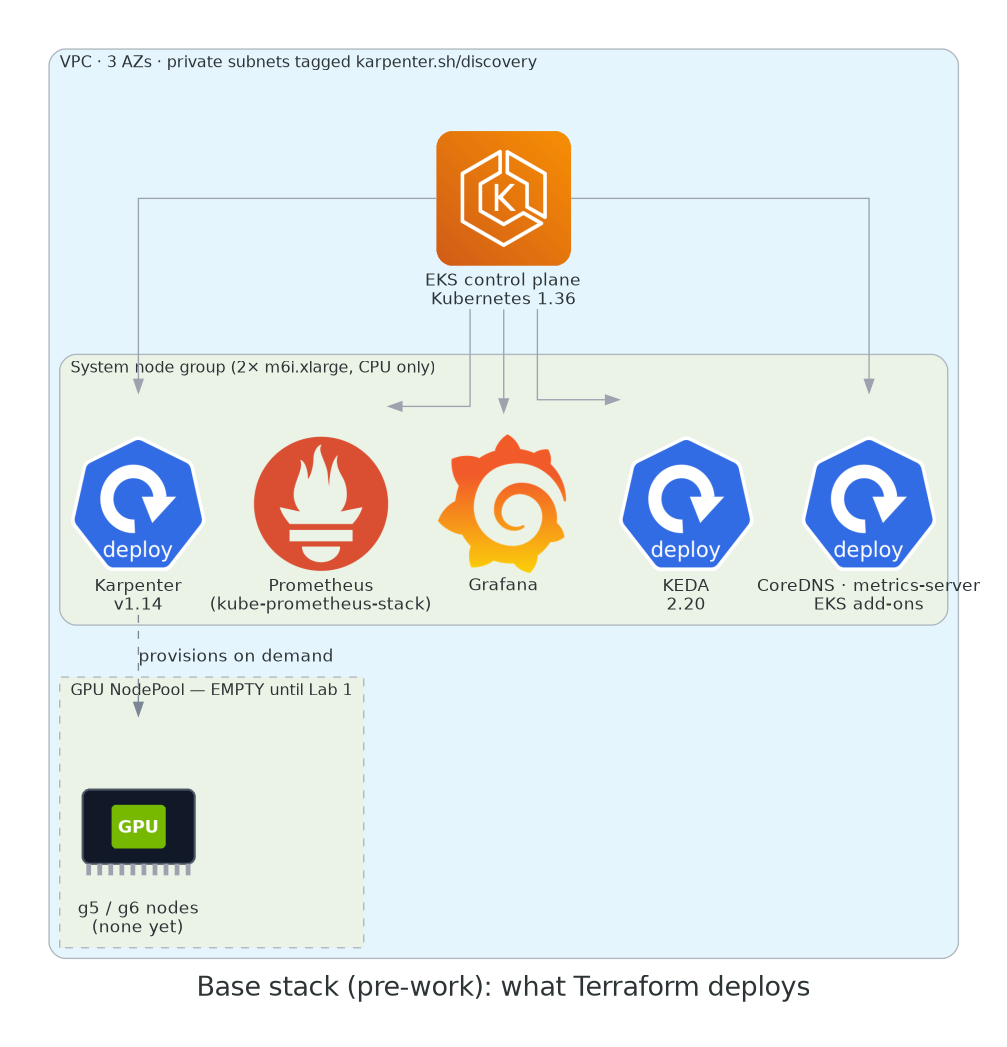
It does not create any GPU nodes. You create those yourself in Lab 1 — that's the whole point. The base stack is only the platform underneath: networking, the control plane, two small CPU nodes, Karpenter, Prometheus/Grafana and KEDA.