3. Deploy the base stack
The base stack is everything except GPUs: the network, the EKS control plane, two small CPU nodes for system components, Karpenter, the Prometheus/Grafana stack and KEDA. It is deliberately boring. In the session we don't touch Terraform at all — every GPU-related layer is something you add by hand so you see it happen.
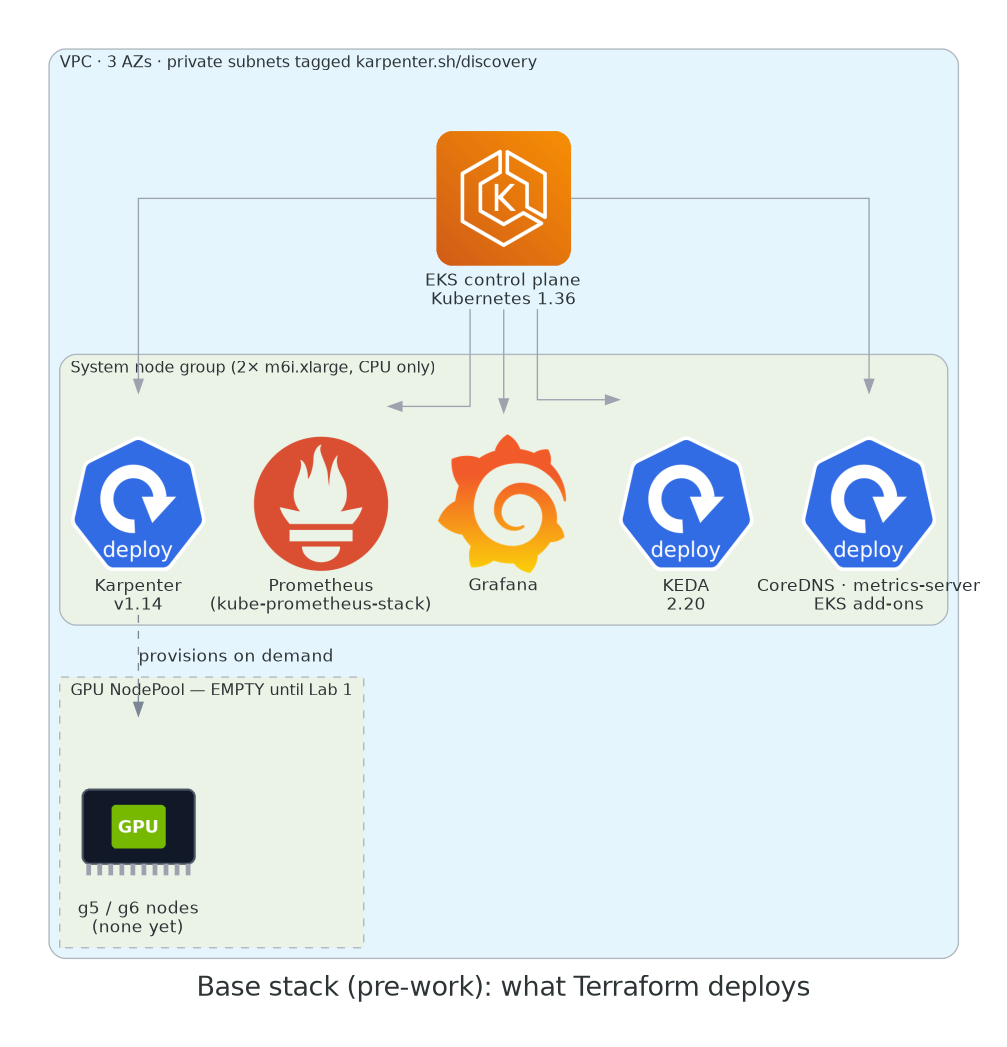
What gets created
| Component | Details |
|---|---|
| VPC | 3 AZs, private subnets for nodes, one NAT gateway, subnets and security group tagged karpenter.sh/discovery=<cluster> |
| EKS | Kubernetes 1.36, public API endpoint (restricted to your IP by default), add-ons: vpc-cni, coredns, kube-proxy, eks-pod-identity-agent, metrics-server |
| System node group | 2 × m6i.xlarge, AL2023 standard AMI. Runs everything that isn't a GPU workload. |
| Karpenter | v1.14, Pod Identity, interruption queue. No NodePool yet — you write it in Lab 1. |
| kube-prometheus-stack | Prometheus (all ServiceMonitors/PodMonitors discovered, no label filtering), Grafana with the NVIDIA DCGM dashboard (ID 12239) pre-imported |
| KEDA | 2.20, ready for the ScaledObject you'll create in Lab 2 |
Nothing NVIDIA. No GPU nodes. Zero nvidia.com/gpu anywhere. Check for yourself after it's up.
Deploy it
make base-up runs terraform init and terraform apply -auto-approve in terraform/, then writes .workshop.env and configures kubectl. Go make coffee; the control plane alone takes 8–10 minutes.
module.eks.aws_eks_cluster.this[0]: Creation complete after 8m42s
module.eks.module.eks_managed_node_group["system"].aws_eks_node_group.this[0]: Creation complete after 2m51s
helm_release.karpenter: Creation complete after 1m03s
helm_release.kube_prometheus_stack: Creation complete after 2m17s
helm_release.keda: Creation complete after 0m48s

Apply complete! Resources: 96 added, 0 changed, 0 destroyed.

Outputs:

api_allowed_cidrs = ["203.0.113.42/32"]
cluster_endpoint = "https://ABC123.gr7.us-east-1.eks.amazonaws.com"
cluster_name = "gpu-workshop"
configure_kubectl = "aws eks update-kubeconfig --region us-east-1 --name gpu-workshop"
grafana_admin_password = <sensitive>
karpenter_node_iam_role_name = "KarpenterNodeRole-gpu-workshop"
karpenter_queue_name = "Karpenter-gpu-workshop"
region = "us-east-1"

wrote .workshop.env:
export CLUSTER_NAME=gpu-workshop
export AWS_REGION=us-east-1
export KARPENTER_NODE_ROLE=KarpenterNodeRole-gpu-workshop

NAME                          STATUS   ROLES    AGE   VERSION
ip-10-0-11-23.ec2.internal    Ready    <none>   3m    v1.36.1-eks-abc1234
ip-10-0-42-118.ec2.internal   Ready    <none>   3m    v1.36.1-eks-abc1234
Two nodes, both CPU. Good.
Customising the stack (optional)
terraform/variables.tf exposes the knobs you might care about: cluster_name, region, kubernetes_version, system_instance_type, grafana_admin_password, and api_allowed_cidrs (defaults to your current public IP). Override with a terraform.tfvars or -var. Don't change the Karpenter or Prometheus values unless you know why — the labs depend on them.
Confirm there are no GPUs
kubectl get nodes -o custom-columns='NAME:.metadata.name,INSTANCE:.metadata.labels.node\.kubernetes\.io/instance-type,GPU:.status.allocatable.nvidia\.com/gpu'
<none> is exactly right. Lab 1 changes that.
Leaving it overnight
The base stack costs about $0.55 per hour idle (EKS $0.10 + two m6i.xlarge ≈ $0.38 + NAT gateway ≈ $0.05, prices for us-east-1 at the time of writing). Twelve hours overnight is under $7. If you'd rather not, make base-down destroys it and you can re-run make base-up an hour before we start.
Karpenter is installed but has nothing to do
If you're curious and run kubectl get nodepools you'll get No resources found. That's intentional. If you copy a NodePool from somewhere on the internet "to try it out" before the workshop, delete it — Lab 1 assumes a clean slate and a stray NodePool with al2023@latest is how you learn the AMI-drift lesson the hard way.